

URL Format
To embed a profile, use the following iframe URL:- username: Replace
Noahscratch493with the Scratch username you want to display.
Example
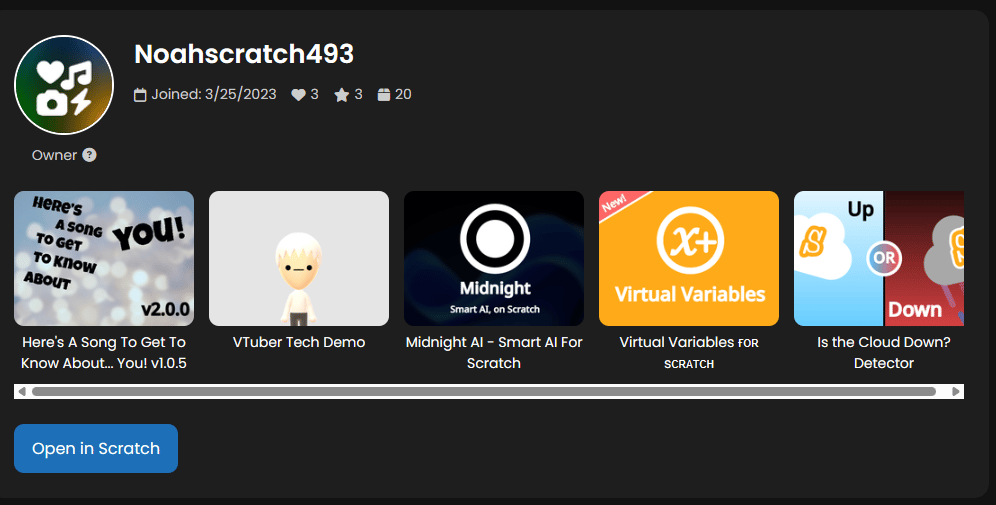
SomeUser. The embed shows:
- Profile Picture in the top left.
- Username and tier, including a tooltip explaining the tier.
- Stats: Followers, Loves, Favorites, and number of Projects.
- Top 5 Projects with clickable thumbnails (opens in TurboWarp or Scratch).
- Open in Scratch button to view the full profile on the Scratch website.
Notes
- The profile embed updates dynamically, so it always shows the latest projects and stats.
- The tier system:
Owner: Special tier for the creator (Noahscratch493).Scratch Staff: Verified Scratch team members.New Scratcher→Master Scratcher: Based on total projects, loves, and favorites.
- Clicking a project opens a project actions overlay, allowing users to run the project in TurboWarp or open it in Scratch.
- You can customize the iframe size using width, height, border, and border-radius styles.
Quick Tip
If you want multiple profiles on the same page, simply add more iframes with different?username= parameters. The embed is designed to be responsive, so it works well side by side or stacked.