> ## Documentation Index
> Fetch the complete documentation index at: https://scratchframe.mintlify.site/llms.txt
> Use this file to discover all available pages before exploring further.
# Studio Embed Documentation
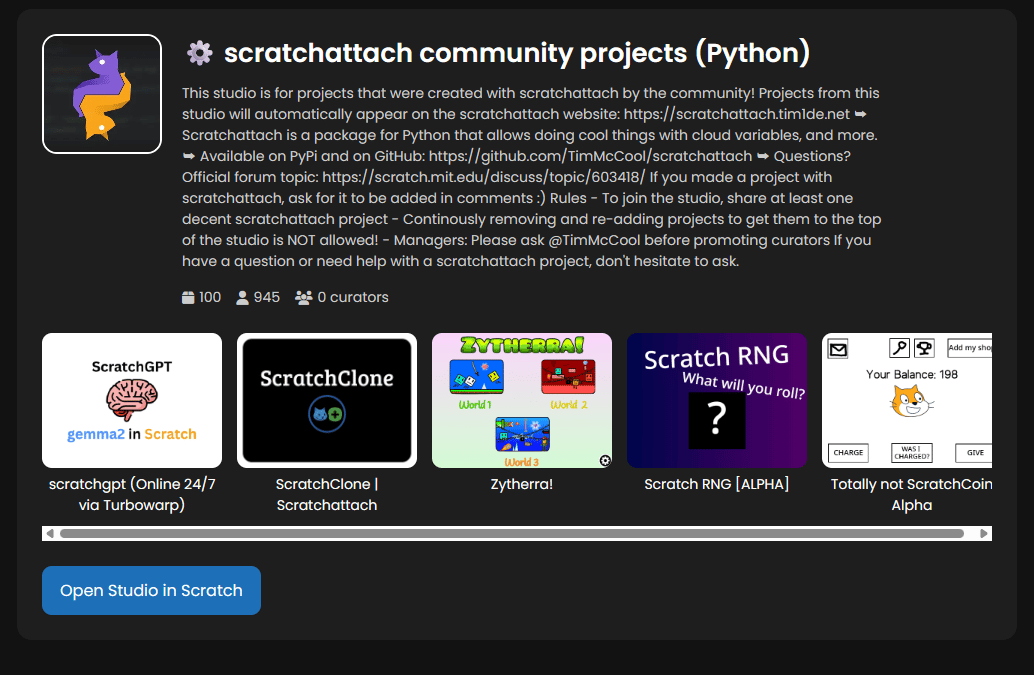
> The Studio Embed allows you to display a Scratch studio on your website. It shows the studio thumbnail, title, description, stats, and top projects. It is fully responsive and works on desktop and mobile.
 ***
## URL Format
To embed a studio, use the following iframe URL:
```html theme={null}
```
* **studio**: Replace `12345678` with the Scratch studio ID.
***
## JSX/React Example
For React or MDX projects, use this format:
```jsx theme={null}
```
***
## Features of the Studio Embed
The embed shows:
* **Studio Thumbnail** in the top left.
* **Studio Title** and **Description**.
* **Stats**:
* Total Projects
* Followers
* Curators
* **Top 5 Projects** with clickable thumbnails:
* Clicking a project opens in **Scratch** in a new tab.
* **Open Studio in Scratch** button.
***
## Notes
* The studio embed **updates dynamically**, so it always shows the latest projects and stats.
* You can **customize the iframe size** using `width`, `height`, `border`, and `border-radius`.
* Multiple studios can be embedded on the same page using separate iframes.
* Projects inside the studio embed open Scratch pages directly, but you can also combine with **project overlay pages** if desired.
***
### Quick Tips
* Make sure the **studio ID** is correct; invalid IDs will show an error.
* The embed is **responsive** and works well on mobile and desktop.
* Style the iframe with CSS to match your website's look, including rounded corners or borders.
***
***
## URL Format
To embed a studio, use the following iframe URL:
```html theme={null}
```
* **studio**: Replace `12345678` with the Scratch studio ID.
***
## JSX/React Example
For React or MDX projects, use this format:
```jsx theme={null}
```
***
## Features of the Studio Embed
The embed shows:
* **Studio Thumbnail** in the top left.
* **Studio Title** and **Description**.
* **Stats**:
* Total Projects
* Followers
* Curators
* **Top 5 Projects** with clickable thumbnails:
* Clicking a project opens in **Scratch** in a new tab.
* **Open Studio in Scratch** button.
***
## Notes
* The studio embed **updates dynamically**, so it always shows the latest projects and stats.
* You can **customize the iframe size** using `width`, `height`, `border`, and `border-radius`.
* Multiple studios can be embedded on the same page using separate iframes.
* Projects inside the studio embed open Scratch pages directly, but you can also combine with **project overlay pages** if desired.
***
### Quick Tips
* Make sure the **studio ID** is correct; invalid IDs will show an error.
* The embed is **responsive** and works well on mobile and desktop.
* Style the iframe with CSS to match your website's look, including rounded corners or borders.
***