> ## Documentation Index
> Fetch the complete documentation index at: https://scratchframe.mintlify.site/llms.txt
> Use this file to discover all available pages before exploring further.
# Explore
# Explore Embed Documentation
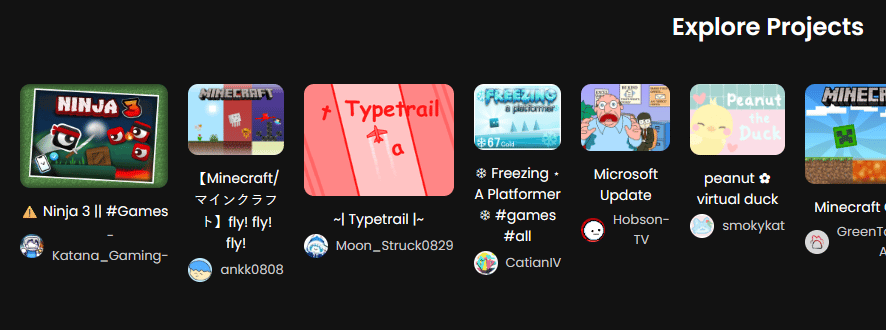
The **Explore Embed** allows you to display Scratch projects from different users on your website. It shows the **project thumbnail, title, author profile picture, and username**. You can click on projects to open them in **TurboWarp** or **Scratch**.
 ***
## URL Format
To embed an Explore feed, use the following iframe URL:
```html theme={null}
```
* The Explore embed shows **projects from multiple users**, updated dynamically.
* You can optionally filter by categories in the future using query parameters.
***
## JSX/React Example
For React or MDX projects, use this format:
```jsx theme={null}
```
***
## Features of the Explore Embed
The embed shows:
* **Project Thumbnail** for each project.
* **Project Title** below the thumbnail.
* **Author Profile Picture** and **Username** under the title.
* Clicking a project opens a **project actions overlay**:
* **Run in TurboWarp**
* **Open in Scratch** in a new tab
* Projects are **dynamically loaded**, showing the latest content from the Scratch Explore API.
***
## Notes
* The Explore embed **updates dynamically**, always showing recent projects from different users.
* You can **customize the iframe size** using `width`, `height`, `border`, and `border-radius`.
* Multiple Explore embeds can be added to the same page without conflicts.
* Styling can be customized via surrounding container styles.
***
### Quick Tips
* Author profile pictures are clickable and will open the **profile embed** in an iframe with a back button overlay.
* Use the **project actions overlay** to let users run projects in TurboWarp or open them directly in Scratch.
* The embed is fully **responsive** for desktop and mobile layouts.
***
## URL Format
To embed an Explore feed, use the following iframe URL:
```html theme={null}
```
* The Explore embed shows **projects from multiple users**, updated dynamically.
* You can optionally filter by categories in the future using query parameters.
***
## JSX/React Example
For React or MDX projects, use this format:
```jsx theme={null}
```
***
## Features of the Explore Embed
The embed shows:
* **Project Thumbnail** for each project.
* **Project Title** below the thumbnail.
* **Author Profile Picture** and **Username** under the title.
* Clicking a project opens a **project actions overlay**:
* **Run in TurboWarp**
* **Open in Scratch** in a new tab
* Projects are **dynamically loaded**, showing the latest content from the Scratch Explore API.
***
## Notes
* The Explore embed **updates dynamically**, always showing recent projects from different users.
* You can **customize the iframe size** using `width`, `height`, `border`, and `border-radius`.
* Multiple Explore embeds can be added to the same page without conflicts.
* Styling can be customized via surrounding container styles.
***
### Quick Tips
* Author profile pictures are clickable and will open the **profile embed** in an iframe with a back button overlay.
* Use the **project actions overlay** to let users run projects in TurboWarp or open them directly in Scratch.
* The embed is fully **responsive** for desktop and mobile layouts.